반응형
개발 환경
Unity 2020.3.13f
Input System 설치하기
가장 먼저 할 일은 프로젝트에 InputSystem을 import 하는 일입니다.
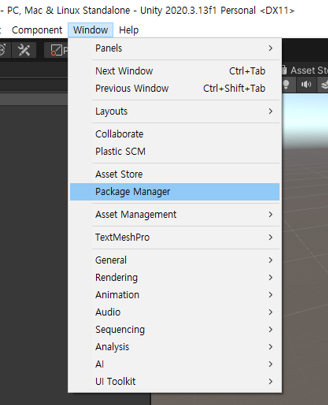
Package Manager를 실행합니다.
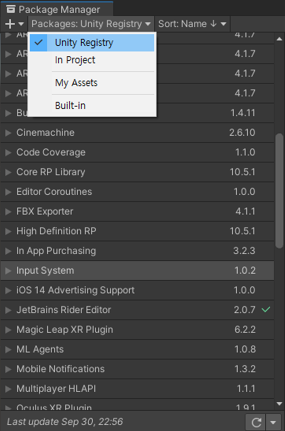

Input System을 찾아 Install을 눌러 설치합니다.

Yes 버튼을 눌러 에디터를 재시작합니다.
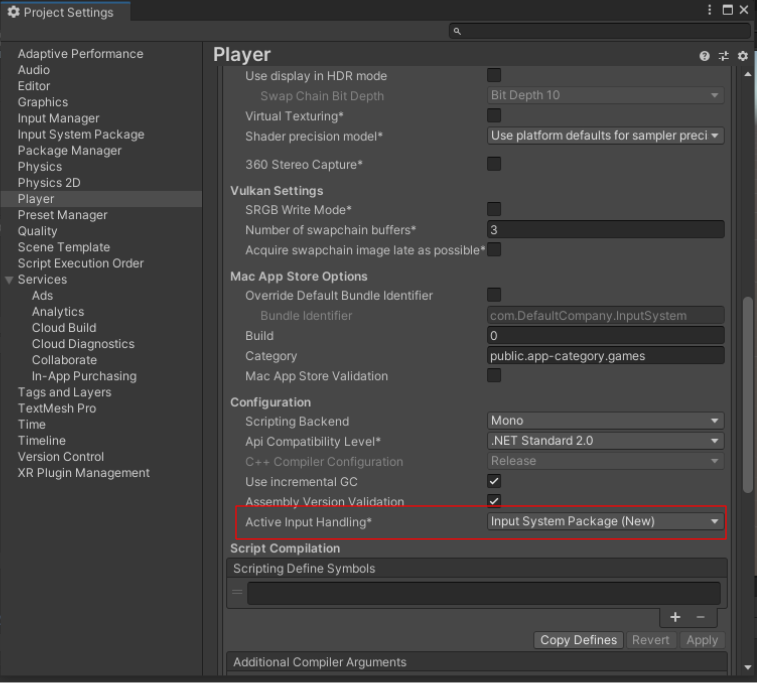
Active Input Handling 이 Input System Package (New) 로 된 것을 확인할 수 있습니다.
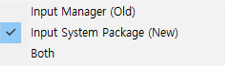
해당 옵션으로 Input System을 변경할 수 있습니다.
참고
https://docs.unity3d.com/Packages/com.unity.inputsystem@1.1/manual/index.html
반응형
'Unity' 카테고리의 다른 글
| DisallowMultipleComponent (0) | 2022.03.20 |
|---|---|
| [Tip] Unity Chan URP 셰이더 에러 수정 (2) | 2021.10.30 |
| Addressable Asset System 예제 (2) | 2021.05.25 |
| [Android] Local Notification (로컬 푸시) 구현하기 (1) | 2021.05.09 |
| Spine 연동 하기 (0) | 2021.05.09 |


